acidcam-gpu + ACMX2 — Complete Technical Reference
acidcam-gpu is a CUDA-accelerated real-time video effects engine. It contains a library of 905 GPU filter kernels that run entirely on the NVIDIA GPU, a unified dispatch kernel that chains any ordered subset of those filters per frame, a rotating device-side frame history buffer for temporal effects, and a CLI application that drives the full pipeline from camera or file input through to live display and optional MXWrite output encoding.
ACMX2 is the Qt-based orchestration layer—it wraps the same library and CLI with a visual interface, shader pass ordering, session persistence, and process monitoring. Together they form a layered creative tool: CUDA for pixel-level power, OpenGL for display, Qt for control, and Podman containers for distribution.
The system operates as a two-stage GPU pipeline: first, CUDA kernels process every pixel in parallel on the GPU’s streaming multiprocessors (one thread per pixel), applying a user-defined chain of filters entirely in device memory. Then, the CUDA output is transferred to OpenGL via a Pixel Buffer Object (PBO) — a zero-copy GPU-to-GPU transfer — where it becomes a texture. GLSL fragment shaders then apply additional full-frame visual effects in one or more stacked passes using ping-pong framebuffers. Both the CUDA filter chain and the GLSL shader pass stack are independently configurable and orderable, producing a combinatorial explosion of possible visual outcomes.
Source: https://github.com/lostjared/acidcam-gpu — C++20 / CUDA 12.x / OpenCV CUDA / OpenGL / Qt6 / MXWrite.
Full Doxygen Documentation for ACMX2
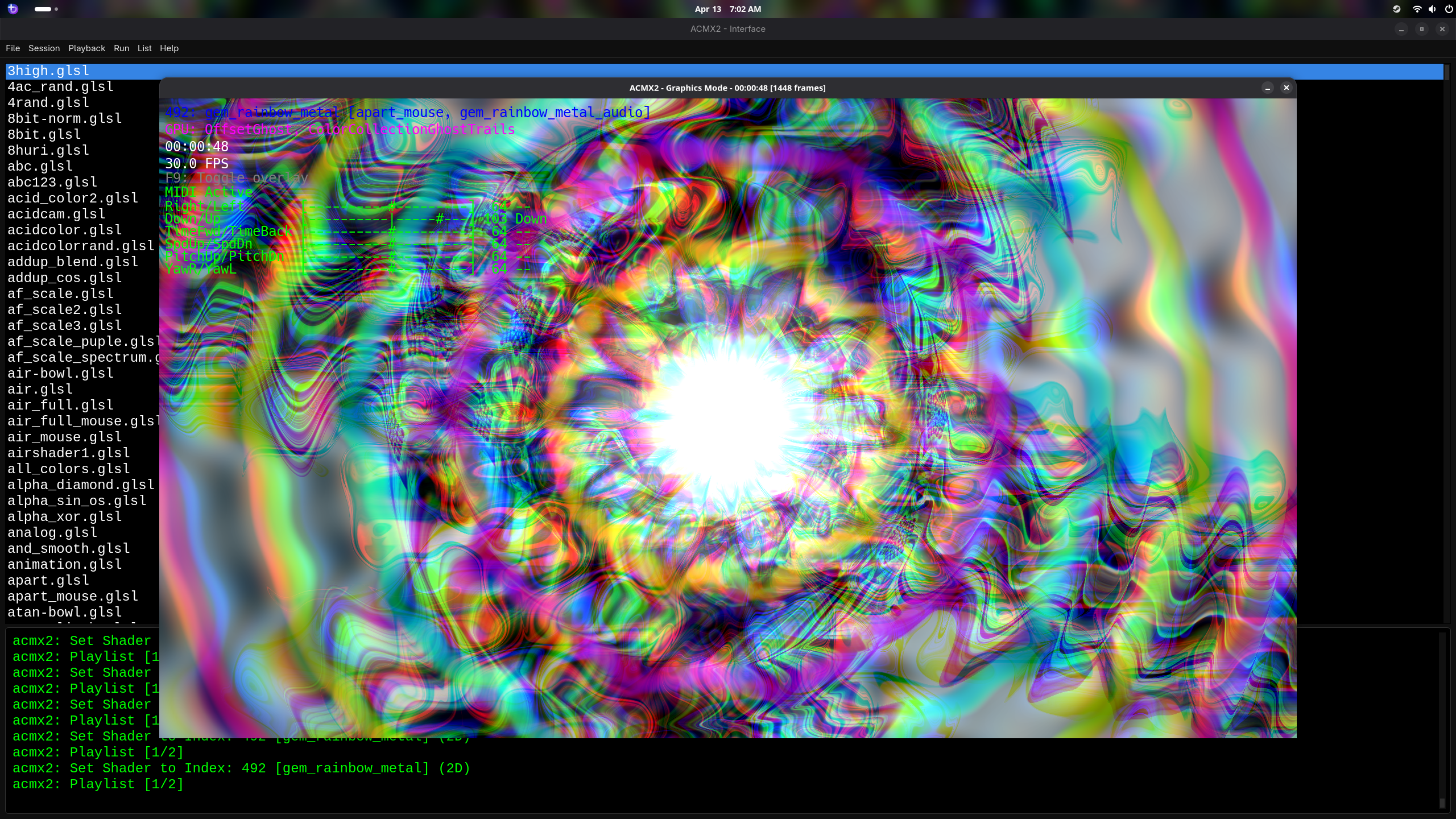
Program Screenshot
This is the current desktop ACMX2/acidcam-gpu interface in action.
Project Origin and Purpose
The Acid Cam project originated as a CPU-based filter library (libacidcam) that applied artistic glitch effects to camera and video frames. As resolutions grew and filter stacks became more complex, CPU-based pixel processing became a bottleneck — applying dozens of per-pixel transforms on high-resolution video ate into frame budget quickly.
acidcam-gpu was created to solve this. The solution was to port the entire filter library to NVIDIA CUDA, so all pixel work runs massively in parallel on the GPU. A unified dispatch kernel allows any ordered combination of the 905 available filters to run in a single GPU pass per frame, without recompiling. The result is a system capable of applying complex multi-layer visual transforms at full framerate on modern NVIDIA hardware.
GPU Filter Browser (with descriptions) - Example Shaders (with descriptions)
Why CUDA Kernels and GLSL Shaders?
Both CUDA kernels and GLSL shaders execute on the same physical hardware — the GPU’s streaming multiprocessors (often marketed as “CUDA cores”). The difference is the programming model, not the silicon. CUDA is NVIDIA’s general-purpose compute API: kernels can freely read from arbitrary device memory, perform complex conditional logic, access a ring buffer of historical frames, and do per-pixel computation without any graphics pipeline constraints. GLSL runs through the OpenGL graphics pipeline as fragment shader programs, which excel at texture sampling, interpolation, and full-frame image processing with Shadertoy-compatible uniforms like time, resolution, and mouse position. By using both programming models on the same GPU hardware, the system gets the best of each approach.
How Each Technology Is Used
- CUDA (pixel-level compute): The 905 filter kernels run as CUDA threads — one thread per pixel — across the GPU’s streaming multiprocessors simultaneously. A 1920×1080 frame launches over 2 million threads in parallel. The unified kernel loops through the user's selected filter chain, applying each filter sequentially to the pixel data in-place. Filters can read from a ring buffer of prior frames stored entirely in GPU memory, enabling temporal effects like
MedianBlend (averaging across all history frames), AuraTrails (blending against frames at indices 1, 4, and 7), and MatrixOutline (comparing against a frame from 4 steps back). This kind of arbitrary multi-frame memory access is natural in the CUDA compute model but difficult or impossible within the GLSL fragment shader pipeline, which is designed around single-texture-per-pass processing.
- GLSL (full-frame shader effects): After CUDA processing, the result is transferred to an OpenGL texture via PBO interop (no CPU round-trip). GLSL fragment shaders — running on the same GPU hardware via the OpenGL graphics pipeline — then process the entire frame as a texture, applying effects like color grading, distortion, glow, CRT simulation, and other post-processing transforms. The shader library supports Shadertoy-compatible uniforms (
iTime, iResolution, iMouse, iFrame, etc.) and can render onto 2D quads or 3D model geometry via MXMOD meshes.
- Composition: CUDA filters and GLSL shaders compose at the frame level. CUDA runs first on the raw pixel data, then GLSL operates on the CUDA-filtered result. Both stages support stacking — multiple CUDA filters chain inside a single kernel launch, and multiple GLSL shaders chain via ping-pong framebuffer passes. The full pipeline is: Camera → CUDA filter chain → PBO transfer → GLSL shader pass 1 → GLSL shader pass 2 → … → Screen.
ACMX2 Qt Application — Orchestration Layer
ACMX2 is the Qt6 application that wraps the acidcam-gpu CLI and library into a controllable desktop session. It handles shader pass management, GPU filter ordering, session persistence, and process lifecycle — it does not re-implement any pixel processing itself.
- Main window:
ACMX2/interface/main_window.cpp — QProcess supervision, log rendering, session menu
- GPU filter dialog:
ACMX2/interface/gpufilter.cpp — calls --list-filters, parses output, stores ordered selection
- Shader pass ordering:
ACMX2/interface/shaderpass.cpp — explicit multi-pass chain, output of pass N feeds into pass N+1
- Audio integration:
ACMX2/audio.cpp/.hpp — RtAudio amplitude extraction, reactive parameter modulation
- Shader cache:
ACMX2/program.cpp/.hpp — binary cache with source+driver fingerprinting to skip recompile
- 3D geometry:
ACMX2/models/*.mxmod — MXMOD-format geometry used in scene-influenced render stages
- Build:
ACMX2/CMakeLists.txt and ACMX2/interface/CMakeLists.txt — validates CUDA, OpenCV CUDA headers, FFmpeg, MXWrite, Qt6, RtAudio at configure time
How the Qt Interface Works
- Filter discovery:
gpufilter.cpp spawns the acmx2 binary with --list-filters, reads index:name lines from stdout, sorts the list alphabetically, and populates a selection dialog. The user picks from the full 905-filter catalog and reorders them via drag or list controls.
- Chain persistence: selected filter order is stored as an ordered index list and passed back to
acmx2 as arguments at run time. Changing the order produces a completely different visual output without touching any code.
- Process supervision:
main_window.cpp binds a QProcess to the acmx2 executable (built from ACMX2/acmx.cpp). stdout/stderr streams are captured and shown in the UI log panel so runtime errors (bad camera index, missing CUDA device, encoder failure) are immediately visible.
- Session settings:
QSettings persists executable path, shader directory, preferred styles, and last-used filter chain so sessions can be resumed exactly.
- Shader pass layer:
shaderpass.cpp manages an ordered list of GLSL pass configs. Each pass uses the previous pass output as input, compositing GLSL effects on top of the CUDA-processed frame.
- Audio-reactive path: when RtAudio is enabled at compile time, an audio callback computes per-buffer amplitude average. This value can modulate alpha or other per-frame parameters, making output visually reactive to microphone or line input.
Standalone CLI — acidcam-gpu/app/main_cv.cu
The standalone CLI app (app/main_cv.cu) is an independent tool that drives the CUDA filter pipeline directly from the command line without ACMX2. It handles input device management, argument parsing, frame loop control, animation state evolution, and output encoding. It is written in CUDA C++ (compiled by nvcc) and targets C++20. Note: the ACMX2 Qt interface does not supervise this file — instead, QProcess launches and monitors the acmx2 executable (built from ACMX2/acmx.cpp), which contains its own runtime loop and GL/CUDA pipeline.
Startup: Device and Camera Discovery
checkDevices(): calls cudaGetDeviceCount(). If the count is zero or the call errors, it prints a detailed message (driver not installed, GPU not seated) and exits immediately. On success, prints the CUDA device short info via OpenCV's cv::cuda::printShortCudaDeviceInfo().listGraphicsCards(): enumerates all CUDA devices using cv::cuda::DeviceInfo, prints each device's name and total VRAM in MB.listCameras(): probes /dev/video0 through /dev/video9 with cv::VideoCapture. During probing, stderr is redirected to /dev/null to suppress OpenCV's verbose device error messages. For each working device, reads its human-readable name from /sys/class/video4linux/videoN/name.- Signal handling: a custom
Interrupt exception class and a signalHandler that throws it allows SIGINT/SIGTERM to cleanly unwind the frame loop without leaving the CUDA device in a dirty state.
AnimationState — The Per-Frame Parameter Evolution Engine
The AnimationState struct (global gState) drives the continuous evolution of visual parameters each frame. This is what makes the visuals non-static — the same filter chain produces different pixel values every frame because the parameters feeding it change continuously:
- alpha oscillation:
alpha starts at 1.0 and increments by 0.01f per frame until it reaches 3.0f, then decrements back to 1.0f. This creates a smooth breathing rhythm in blend-intensity across all alpha-parameterized filters. The full cycle takes 400 frames at 60fps ≈ 6.7 seconds.
- frame index oscillation:
current_frame_index bounces between 0 and arraySize - 1, incrementing or decrementing by 1 each frame based on index_dir. This continuously sweeps which historical frame is selected by the start_index parameter — effects that read from frame history change which past frame they reference every tick.
- square_size oscillation:
square_size oscillates between 2 and 64 pixels, changing by 2 per frame. This controls block and tile dimensions for square-based effects. The oscillation causes visible growth and shrinkage in any block-decomposition filter.
updateAndDraw() — The Frame Processing Function
Called every frame of the main loop, this function performs the full GPU pipeline:
- Updates all three AnimationState values (alpha, frame_index, square_size) based on their current direction and bounds.
- Copies device frame pointers from the
DynamicFrameBuffer's rawPointers vector into the device-side pointer array (d_ptrList) via cudaMemcpy(HostToDevice).
- Copies the most recently uploaded frame from the buffer into the working GPU buffer using
cudaMemcpy2D(DeviceToDevice) — this is a pure device-to-device copy, no round-trip through CPU RAM.
- Calls
launch_filter() with the current animation state, the working buffer, and the active filter list. The CUDA kernel runs and transforms the working buffer in-place.
- The processed frame in the GPU working buffer is then downloaded or blitted for display/encoding.
Output Encoding via MXWrite
When recording is enabled, processed frames are passed to the MXWrite library which wraps FFmpeg encoding. MXWrite accepts raw frame data and handles container muxing, codec selection, and file writing. This keeps encoding off the critical path — the CUDA filter loop is not blocked by disk I/O.
The Public API — ac-gpu.hpp
The header acidcam-gpu/include/ac-gpu/ac-gpu.hpp defines the complete ABI contract between the host application and the CUDA engine. Everything the caller needs to know lives here.
Key Types and Definitions
AC_FILTER_MAX = 905 — the total number of available filters. Filter indices run from 0 to 904 inclusive. This constant lets callers validate index bounds before dispatch.struct GPUFilter { int index; } — the lightweight device-side representation of a filter. Only the integer index crosses to the GPU; names and metadata stay on the host.struct Filter { int index; std::string name; GPUFilter toGPU() const; } — the host-side filter descriptor. toGPU() produces the compact GPUFilter for device transfer.class ACException — thin exception type for runtime errors (bad resolution strings, missing devices). Carries a message string via why().CHECK_CUDA(call) — macro that wraps any CUDA runtime call, checks the error code, prints file/line/message, and exits on failure. Used throughout both the library and the CLI app for consistent error handling.extern Filter filters[] — the master filter table defined in filters.cu, exposed for host-side iteration. Callers can walk this array to build filter lists, populate UI controls, or serialize chain configs.
The DynamicFrameBuffer Class
DynamicFrameBuffer manages a ring of historical frames entirely in device memory (cv::cuda::GpuMat). This is the mechanism that makes temporal effects possible — filters can read from any prior frame in the ring without downloading anything to host memory.
- Construction: takes an
arraySize parameter (e.g., 8) that sets ring depth. Internally creates a std::vector<cv::cuda::GpuMat> and a parallel std::vector<unsigned char*> of raw device pointers.
update(const cv::Mat& inputFrame):
- Uploads the CPU frame into
d_uploadBuffer (a staging GpuMat) via d_uploadBuffer.upload(inputFrame).
- On resolution change, reallocates all ring slots as
CV_8UC4 (8-bit per channel, 4 channels RGBA) at the new dimensions and resets completedFrames = 0.
- Calls
std::rotate(deviceFrames.begin(), deviceFrames.begin()+1, deviceFrames.end()) — this shifts the oldest frame to position back() without copying pixel data, just rotating smart handles.
- Converts and copies the new frame into the back slot: if the upload buffer is 3-channel BGR (standard OpenCV camera output),
cv::cuda::cvtColor(d_uploadBuffer, deviceFrames.back(), cv::COLOR_BGR2RGBA) converts to 4-channel RGBA on the GPU. If already 4-channel, a direct copyTo is used.
- Syncs
rawPointers[i] = deviceFrames[i].data for all slots, giving the kernel a plain raw pointer into each frame's device memory.
- Increments
completedFrames up to arraySize, tracking how many valid (non-zero) history entries exist before the ring fills.
getDeviceFramePointers(): returns the rawPointers.data() — a host-side array of device pointers. This is copied to a device-side pointer array before kernel launch so the kernel can dereference historical frame data.- Memory layout: each
cv::cuda::GpuMat is a pitched allocation. The framePitch value (row stride in bytes) is stored on first allocation and passed to kernel as step. Pitched memory improves coalescing for row-based access patterns.
The launch_filter() Function
This is the C-linkage function that the host calls every frame to execute the filter chain. It handles lazy filter list management and kernel dispatch:
- Guard: returns immediately if
c == 0 (no filters), dimensions are zero, or numFrames is zero.
- Lazy filter list rebuild: if
changed == true or the device filter list pointer is null, it synchronizes the device (cudaDeviceSynchronize), frees any existing device list, converts host Filter[] → GPUFilter[] using toGPU(), allocates a new device array with cudaMalloc, and copies with cudaMemcpy(HostToDevice). Sets changed = false after update. This means re-ordering the filter chain is essentially free at runtime — the rebuild only happens when the chain actually changes.
- Grid/block computation:
dim3 blockSize(16, 16) — 256 threads per block arranged in a 2D tile. dim3 gridSize((width+15)/16, (height+15)/16) — enough tiles to cover the full frame, rounded up so edge pixels are handled correctly.
- Per-frame parameter assembly: a fresh
FilterParams struct is built each frame using the current animation state and fresh random values from rand(). This per-frame randomness is what makes the visuals continuously evolve without any explicit animation scripting.
- Kernel dispatch:
unifiedFilterKernel<<<gridSize, blockSize>>>(d_list, c, data, allFrames, w, h, step, params).
- Synchronization:
cudaDeviceSynchronize() is called after the kernel launch to ensure the frame is fully processed before the result is read or displayed.
FilterParams — The Per-Frame Parameter Bundle
The FilterParams struct is defined inside the ac_gpu namespace in filters.cu and is passed by value into the kernel. Every filter case inside the kernel reads from this shared param bundle rather than maintaining its own state, which is what enables stateless per-pixel execution. The parameters are populated freshly each frame by launch_filter:
float alpha — blend intensity multiplier. In the CLI, this oscillates between 1.0 and 3.0 (±0.01/frame). Used by blending and alpha-scaling filters to modulate mix ratios. At 1.0, blends are subtle; at 3.0, blends are oversaturated and aggressive.bool isNegative — when true, the setAlpha device function inverts all three color channels (255 - value) after each pixel's filter chain completes. This globally toggles a photographic negative effect that stacks on top of any filter output.int numFrames — number of valid entries in the history ring (up to arraySize). Filters that index into allFrames[] use this to avoid reading uninitialized slots before the buffer is full.int square_size — block tile dimension in pixels, oscillates between 2 and 64. Controls the tile/block granularity for effects like SquareBlockResize, DiagPixelated, pixelScale, and others that work in rectangular pixel regions.int start_index — the current bouncing frame selection index (0 to arraySize-1). Passed directly to effects that use it as a frame history lookup index, creating smooth temporal sweeping.int start_dir — the direction of the frame index bounce (1 = forward, 0 = reverse). Some effects use this to modulate the direction of their temporal lookup.int int_param1 — rand() % height. Used as a random vertical offset for pixel shift effects (PictureShiftDown, DistortedLinesY, etc.). Changes every frame so shifts appear random and non-repeating.int int_param2 — rand() % width. Same concept as int_param1 but horizontal. Used for horizontal shift and distortion effects.float float_param1 — (float)(rand() % 255). A random brightness or gradient value. Used in effects like GradientFlashColor where a random scalar modulates the gradient output per frame.int seed — rand(). Per-frame random seed passed to gpu_rand(x, y, seed) inside device functions. Since gpu_rand is deterministic given the same (x, y, seed), all threads with the same seed get the same noise map — but the map changes every frame because the seed is regenerated.int frame_count — monotonically increasing counter (frame_counter++). Used for time-based oscillations inside device functions (e.g., processTripHSV uses it to advance HSV hue over time, get_osc_offset uses it for sinusoidal offsets). This is the primary time variable for all internally animated kernels.int sumR, sumG, sumB — each set to rand() % 255 per frame. Used in bitwise XOR effects like XorSumStrobe where the pixel's channels are XOR'd against a random color triplet, creating a color-shifting strobe.int threshold — fixed at 15. Used by colorBounds() in effects that do color comparison (e.g., StrangeGlitch switches to a historical frame pixel when the current and historical color differ by more than the threshold). Tuned to ignore slight color noise while catching meaningful motion.int sw, sh — dynamic block dimensions: 16 + (frame_counter % 48). Creates a slowly growing/shrinking block size for diagonal pixelated effects like DiagPixelatedResize. The range is 16 to 63 pixels wide/tall, cycling over 48 frames.
The Unified Kernel — unifiedFilterKernel
The __global__ void unifiedFilterKernel is the single CUDA kernel that executes the entire filter chain per frame. It is the pixel-level engine of the whole project. Understanding how it works explains why the system can run any combination of 905 effects in real-time.
Thread Layout and Pixel Assignment
Each CUDA thread is assigned one pixel:
int x = blockIdx.x * blockDim.x + threadIdx.xint y = blockIdx.y * blockDim.y + threadIdx.y
With blockDim = (16, 16), each block contains 256 threads arranged as a 16×16 tile of pixels. A 1920×1080 frame requires ceil(1920/16) × ceil(1080/16) = 120 × 68 = 8160 blocks. At 256 threads per block, that is 2,088,960 threads — one per pixel — all executing simultaneously on the GPU.
A bounds check (if (x >= width || y >= height) return) handles edge tiles where the grid doesn't align perfectly with frame dimensions.
The Filter Chain Loop
Inside each thread's pixel scope, the kernel loops over the filter list:
for (int i = 0; i < count; ++i) {
    switch (filters[i].index) {
        case 0: processSelfAlphaBlend(x, y, data, step, params); break;
        case 1: processMedianBlend(x, y, data, allFrames, step, params); break;
        // ... 734 more cases ...
        case 735: processHueWobble(x, y, data, step, params); break;
    }
}
Each process*() call is a __device__ function that reads and writes the pixel at data[y * step + x * 4] in RGBA byte order. Because all threads within a warp execute the same filter index at the same time, the switch dispatch is warp-coherent when all threads in the warp are processing the same filter — which they always are, since the filter list is shared params, not per-pixel data.
After the loop completes, setAlpha(data, y * step + x * 4, params.isNegative) is called once to finalize the alpha channel and optionally negate the color.
Device Helper Functions
__device__ float gpu_rand(int x, int y, int seed) — a deterministic per-pixel hash function. Uses three multiply-and-XOR operations seeded by x, y, and the per-frame seed, followed by XOR-shift scrambling, returning a float in [0, 1). Used by noise effects (VisualSnow, StaticGlitch, RandomPixels, DistortedLines) to generate pixel-level noise without any global shared state, which is important since CUDA threads cannot safely share mutable state.__device__ void setAlpha(unsigned char* data, int idx, bool isNegative) — if isNegative, inverts R, G, B (three bytes at idx, idx+1, idx+2). Always writes 255 to the alpha byte (idx+3), ensuring fully opaque output regardless of what filters wrote to that byte.__device__ bool colorBounds(r1,g1,b1, r2,g2,b2, ir,ig,ib) — returns true if the absolute difference of each channel pair is within the given threshold. Used by motion-detection effects: StrangeGlitch uses it to detect when a pixel has changed significantly between frames and swap in the historical pixel value; MatrixOutline uses it to zero out pixels that match a reference frame (creating a motion-outline effect).
The Filter Catalog — 905 Effects Across All Categories
The filter table is defined at the top of filters.cu as a static array of Filter structs. Index 0 through 904 are defined. Each filter has its own __device__ implementation function but all are dispatched through the single unified kernel switch. Here is a breakdown of the major effect families that make up the library:
Temporal / Trail Effects
Read from historical frames in the DynamicFrameBuffer ring to create motion persistence, ghosting, and smear effects.
MedianBlend — averages current pixel against all history frames + XOR + contrast boostAuraTrails — blends against frames at history indices 1, 4, and 7MotionGhostTrails — linear blend between current and oldest frame via alphaWaveTrails — wave-modulated temporal blendRGBLineTrails / RGBWideTrails / RGBLongTrails — per-channel trail variations with different decay widthsProperTrails / ShortTrail — clean blend-from-history patternsAcidTrailsBlend / GhostTrailsBlend — higher-level composites of trail motionEchoBlend / EchoShift / TrailEcho — echo-delay style history readsFrameBlendMulti / FrameBlendMultiX — blending across multiple history slots simultaneously
Geometric Distortion
Remap pixel coordinates — shift, stretch, warp, flip, tear, and distort spatial layout.
PictureShiftDown / PictureShiftRight / PictureShiftVariable — whole-frame translate by random pixel offsetStretchR/G/B_Right / StretchR/G/B_Down — per-channel horizontal or vertical stretchTearRight / TearDown — VHS-style tape tear distortionsDistortionByRow / DistortionByCol — row/column-level random displacementRippleEffect / ShockWave / TwistEffect — radial math-based spatial warpsFishEye / TunnelEffect / VortexEffect / Kaleidoscope — polar coordinate remap effectsSpiralWave / SpiralTrail — spiral coordinate mappingZoomBlur / RadialBlur / RotateBlend — zoom and rotational blur patternsExpandContract / ExpandLeftRight / DiagInward — pixel expansion/contraction patternsMirrorWave / MirrorWaveX / MirrorWaveY — wave-modulated mirror remap
Color Manipulation
Alter pixel color values mathematically without spatial remapping.
SelfAlphaBlend — multiplies each channel by (1 + alpha)SelfScaleRefined / SelfScaleByFrame — channel scaling with clampingTripHSV — converts to HSV, cycles hue by frame_count, converts backGradientRainbow / GradientSelf / GradientDown / GraidentHorizontal — positional gradient overlaysFadeRtoGtoB / FadeRGB_Speed / FadeRandomChannel — sequential channel fade patternsColorAccumulate1/2/3 / colorAccumulate — accumulation blend seriesHueRotate / ChromaticAberration / RGBShift — color space shift effectsPosterize / Solarize / GammaBright / GammaDark / ContrastBoost / ContrastReduce — tone-mapping operationsTruncateColor / TruncateVariable / TruncateVariableScale — color depth reduction patternsColorDrift / ColorPulse / ColorPulseRGB / ColorFadeFilter — time-animated color drift series
Bitwise / XOR Operations
Apply bitwise logic (XOR, AND, OR) between pixel channels, historical frames, or random values.
Bitwise_XOR / Bitwise_AND / Bitwise_OR — current frame XOR/AND/OR with history frameXorSumStrobe — XORs each channel against a random sumR/G/B valueXorAlpha / XorFade / XorSine / XorLag / XorScale — XOR variant seriesSelfXorBlend / SelfXorDoubleFlash / SelfOrDoubleFlash — self-XOR patternsBitwiseXorStrobe / BitwiseRotateBlend / BitwiseXorScaleBlend — scaled and rotated XOR blendsAndStrobe / AndStrobeScale / AndOrXorStrobe / AndOrXorStrobeScale — AND-based strobe familyMedianBlendXor / CollectionAlphaXor — XOR composited with median blend
Glitch and Noise
Simulate digital corruption, static, tracking errors, and signal noise.
StrangeGlitch — color-bounds detection, swaps pixel with history when change detectedHorizontalGlitch / VerticalGlitch — glitch lines by row or column history samplingPixelGlitch / StaticGlitch / LineGlitch / BoxGlitch — progressive glitch typesGlitchBlock / GlitchBlockXor / GlitchLine / GlitchLineX — block and line glitch familyVisualSnow / VisualSnowX2 — gpu_rand-based noise overlayNoiseBlend / NoiseBlendX2 / NoiseXor / NoiseBlendX — noise blend familyVHSTracking — emulates VHS head-tracking horizontal tear artifactDataCorrupt / DigitalArtifact / TapeGlitch / ColorGlitch — digital corruption effectsSliceGlitch / GlitchSort / GlitchMosaic — sorted and mosaic-style glitch
Scan / Line Effects
Work on scanline-level patterns, interlacing, and whole-row/column operations.
InvertedScanlines / ScanSwitch / ScanAlphaSwitch — scanline inversion and toggleHorizontalLines / DiagonalLines / BlackLines / LongLines — line overlay patternsLineInLineOut series (39–47, 262–264) — complex oscillating line-in/line-out passesYLineDown / YLineDownBlend — vertical line drift effectsLineGlitch / LineGlitchX / LineAcrossX / LinesAcrossX — line-based glitch patternsBlendedScanLines / InterlaceBlend — interlace-style line blendingShiftLinesDown — whole-scanline vertical displacement
Block / Square Effects
Operate on rectangular pixel regions — pixelation, block swapping, tile-based transforms.
SquareBlockResize — divides frame into horizontal bands, each blended against a different history frameSquareShrink — clamps inner region against history frame based on oscillating offsetSquareByRow / SquareByRowRev / SquareByRow2 / SquareByRow2Plus — row-ordered block history samplingDiagPixelated / DiagPixelatedResize — diagonal block averaging with fixed or variable tile sizePixelateBlend / PixelateRect / PixelateWave / MosaicBlend — pixelation and mosaic blendsBlockPixels / BlockScale / BlockXor / BlockStrobe — block-level transform seriesBlockyTrails16 / BlockyTrails32 — block-sized history trailsBlockSwap — swaps pixel blocks between current and history
Wave / Oscillation Effects
Use sine, cosine, square, triangle, sawtooth, and pulse waveforms to drive pixel displacement or color modulation.
SineWaveDistort / CosineWaveDistort — horizontal/vertical sinusoidal pixel shiftingSineWaveBlend / CosineWaveBlend / SinCosBlend — wave-modulated blendsSquareWave / SquareWaveX / SquareWaveBlend — square wave color/blend modulationTriangleWave / TriangleWaveBlend — triangle wave modulationSawtoothWave / SawtoothWaveBlend — sawtooth wave modulationPulseWave / PulseWaveBlend / PulseRadial / Pulse — pulse-shape modulationStepWave / StepWaveBlend — step-function wave modulationWaveBlend / WaveBlendX2 / WavePattern / WavePatternXor — generic wave blend seriesMirrorWave / SpiralWave / VortexEffect / TwistEffect — complex wave-geometry hybrids
Mirror / Reflection
Symmetric transforms that fold, flip, or reflect pixel coordinates.
MirrorReverseColor — four-point mirror average (top-left, bottom-left, bottom-right, current) with channel reversalAlphaBlendMirror / MirrorXorAlpha — mirror with alpha and XOR compositingIntertwinedMirror — interleaved mirror blendMirrorReverseColorBlend — blended version of MirrorReverseColorFlipAlphaBlend / RandomFlipFilter / FlipPictureShift / FlipMirror — flip transform seriesDiagMirror / ShadowMirror / GhostMirror / FacetMirror — diagonal and ghost mirror typesKaleidoscope / KaleidoscopeBlend / KaleidoBlend / KaleidoScope4 / MirrorKaleid — kaleidoscope familySplitMirror / TripleSplit / PrismSplit — split-panel mirror effects
Pixel Read / Strobe / Blend Collections
Effects that do frame-history collection reads, random collection sampling, or strobe-pattern switching.
StretchColMatrix8/16/32 — samples history at (x / sw) % numFrames column strideColorCollectionSubtleStrobe / CollectionRandom / CollectionAlphaXor — collection random/strobe seriesColorCollection64X / ColorCollectionSwitch / ColorCollectionRGB_Index — indexed collection blendsColorCollectionGhostTrails / ColorCollectionScale / ColorCollectionReverseStrobe — ghost and scale variantsBlendWithSource25/50/75/100 — fixed-ratio blends with history sourceBlendFor360 / BlendForward16 / BlendForward32 / BlendFromXtoY — direction-controlled blend seriesFadeInAndOut / FadeBlendXor / FadeBars — fade pattern seriesMildStrobe / BrightStrobe / DarkStrobe / StrobeEffect / StrobeXor — strobe type family
Advanced / Cinematic Effects
Higher-complexity effects that combine multiple techniques or simulate specific visual phenomena.
CRTCurvature — simulates CRT screen barrel distortionFilmGrain — per-pixel noise scaled by luma to simulate analog grainChromaticAberration / ChromaticAberrationX — RGB channel lateral displacement simulating lens chromatic errorLensFlare / LightLeak / GlowTrails / NeonGlow / GlowEdge / GlowPulse — optical glow/flare familyNightVision / InfraredView / ThermalBlend — synthetic imaging modalitiesMatrixCode / DigitalRain — column-drip pattern simulating cascading character streamsWaterColor / OilSlick / LiquidMetal / LavaLamp — fluid/material simulation-inspired effectsHeatDistort / HeatRipple / HeatWave — heat shimmer displacement seriesSobelNorm / DetectEdges / SketchOutline / SobelGlow / ElectricEdge — edge detection and outline familyGalaxySpiral / CosmicDust / StarBurst / Fireworks — space/particle aesthetic effects
Filter Descriptions
The Two-Stage GPU Pipeline — CUDA Compute + GLSL Shaders
The system’s visual power comes from combining two distinct GPU programming models into a single per-frame pipeline. Understanding how each stage works — and how they connect — explains why the project can produce such a large array of effects.
Stage 1: CUDA Compute Kernels — Massively Parallel Pixel Processing
NVIDIA GPUs contain thousands of streaming multiprocessors (SMs), each capable of running many threads in parallel. Both CUDA kernels and GLSL shaders execute on this same hardware — the difference is the programming model. acidcam-gpu uses the CUDA compute model to assign one thread to each pixel of the video frame. For a 1920×1080 frame, the system launches 2,088,960 threads simultaneously, organized into 16×16 blocks of 256 threads each (8,160 blocks total). Every pixel in the frame is processed in parallel — there is no sequential per-pixel loop on the CPU.
Each thread runs the unified dispatch kernel (unifiedFilterKernel), which loops through the user’s selected filter list and applies each filter to that thread’s pixel in order. The kernel contains a 905-case switch statement — each case calls a __device__ function that reads and writes the pixel’s RGBA values at data[y * step + x * 4]. Because every thread in a warp processes the same filter index at the same time (the filter list is shared, not per-pixel), the dispatch is warp-coherent and runs at full GPU throughput.
Crucially, the CUDA filters have access to a ring buffer of historical frames stored entirely in GPU device memory (DynamicFrameBuffer). This means filters like MedianBlend can average across all prior frames, AuraTrails can blend against frames at specific history indices, and MatrixOutline can compare against a frame from several steps back — all without any data leaving the GPU. This kind of arbitrary random-access memory read across multiple frame buffers is what makes the CUDA compute model essential — GLSL fragment shaders run on the same GPU cores but operate within the graphics pipeline, which doesn’t support this kind of free-form device memory access.
Stage 2: GLSL Shaders — Full-Frame Post-Processing
After CUDA finishes processing every pixel, the result must be displayed. Rather than downloading the frame to the CPU and re-uploading it, the system uses CUDA/OpenGL interop via a Pixel Buffer Object (PBO):
- The PBO is registered with CUDA using
cudaGraphicsGLRegisterBuffer
- CUDA maps the PBO into its address space and performs a
cudaMemcpy2D (device-to-device) from the working buffer into the PBO — the frame never touches CPU RAM
- OpenGL binds the PBO as a pixel unpack buffer and calls
glTexSubImage2D to populate a texture — another zero-copy GPU operation
The CUDA-filtered frame is now an OpenGL texture. At this point, GLSL fragment shaders take over. These are standard OpenGL shader programs (GLSL 330 core) that process the entire frame as a texture. The shader library provides Shadertoy-compatible uniforms — iTime, iResolution, iMouse, iFrame, iTimeDelta, iDate, iFrameRate, iSampleRate, plus audio-reactive uniforms amp/uamp — enabling a wide range of full-frame effects like color grading, distortion warps, glow effects, CRT simulation, and procedural pattern overlays.
Shaders can render the texture onto a fullscreen 2D quad (standard image processing) or onto 3D model geometry loaded from MXMOD files, projecting the filtered video onto a rotating or animated mesh.
The Transfer: Zero-Copy GPU Interop
The bridge between CUDA and OpenGL is critical to performance. The TextureUploader class handles this via PBO interop — the CUDA working buffer is copied directly into an OpenGL PBO in device memory, then uploaded to a GL texture, all without a CPU round-trip. This means the entire pipeline — from raw camera frame to final displayed output — can stay on the GPU throughout both the CUDA and GLSL stages.
Filter and Shader Stacking — Two Independent Composable Chains
The system provides two independent stacking mechanisms that compose together: a CUDA filter chain and a GLSL shader pass stack. Users can configure both, and every combination produces a different visual result.
CUDA Filter Chain (Stacking Inside the Kernel)
Users select any subset of the 905 available CUDA filters and arrange them in a specific order. This ordered list is uploaded to GPU memory as an array of GPUFilter structs. Inside the kernel, every pixel thread loops through this array:
for (int i = 0; i < count; ++i) {
    switch (filters[i].index) {
        case 0: processSelfAlphaBlend(x, y, data, step, params); break;
        case 1: processMedianBlend(x, y, data, allFrames, step, params); break;
        // ... 734 more cases ...
    }
}
Each filter modifies the pixel buffer in-place. Filter N reads the output that filter N-1 wrote. This means the filters chain naturally — the output of one becomes the input of the next, all within a single kernel launch. There are no intermediate buffer copies between filters; the stacking is purely sequential modification of the same pixel data.
Rebuilding the filter list is lazy and zero-cost at steady state: the device-side filter array is only reallocated when the chain actually changes (tracked by a changed flag). Re-ordering filters at runtime is essentially free.
GLSL Shader Pass Stack (Ping-Pong Framebuffer Passes)
After CUDA processing, GLSL shaders can be stacked using a multi-pass ping-pong framebuffer technique. The user selects and orders GLSL shader passes through the ShaderPassDialog interface. Each pass works as follows:
- The system maintains two offscreen framebuffers (
passFBO[0] and passFBO[1]) with corresponding textures (passTexture[0] and passTexture[1])
- The input starts as the camera texture (which already contains the CUDA-filtered output)
- For each shader in the pass list:
- Bind
passFBO[pingpong] as the render target
- Activate the pass shader program and set its uniforms (time, resolution, etc.)
- Draw a fullscreen quad sampling from
inputTex
- Set
inputTex = passTexture[pingpong] (the output becomes the next pass’s input)
- Flip
pingpong = 1 - pingpong
- The final texture becomes the input for the main render (2D sprite or 3D mesh)
This allows stacking any number of GLSL shader effects — each one processes the output of the previous, building up complexity layer by layer.
Combined Stacking: The Full Pipeline
Both chains compose into a single per-frame pipeline:
Camera Frame
  → [CUDA Filter 1] → [CUDA Filter 2] → ... → [CUDA Filter N]   (in-kernel chain)
  → PBO interop (zero-copy GPU transfer)
  → [GLSL Shader Pass 1] → [GLSL Shader Pass 2] → ... → [GLSL Pass M]   (ping-pong FBOs)
  → Final composite (2D quad or 3D mesh)
  → Screen / Recording
The user independently controls both the CUDA filter list and the GLSL shader pass list. Changing either one — or just reordering elements — produces a completely different visual result.
Why Stacking Produces “Infinite” Visuals
Each filter and shader is a transformation function. Ordering is not commutative in general, so:
F3(F2(F1(frame))) != F1(F2(F3(frame)))
If you choose n distinct filters and order them, permutations are n!. Even before parameter changes, feedback buffers, and time-varying uniforms, this grows explosively.
- 5 filters → 120 orderings
- 8 filters → 40,320 orderings
- 10 filters → 3,628,800 orderings
With 905 CUDA filters to choose from, plus an independent library of GLSL shaders that also stack and reorder, the combinatorial space multiplies further. Add in the continuously evolving per-frame parameters (alpha oscillation, frame history index, square size, random seeds, frame count) and the visual output becomes effectively unbounded — the same filter chain produces different results every frame because the parameters driving it are always changing.
In-Depth: Why Order Dominates Output
In unifiedFilterKernel, each thread applies filter case statements in strict list order. Many cases are stateful across time because they read allFrames (historical frame pointers) and per-frame randomized params generated in launch_filter.
- Non-commutative transforms: geometric shift then color XOR yields different values than color XOR then geometric shift, because pixel neighborhoods sampled differ.
- Temporal dependency: trail/motion filters sample prior frames; changing order changes which transformed history is fed forward.
- Parameter evolution: alpha, square size, random seed, and thresholds evolve frame-to-frame, so visual output is a time series, not a static map.
- Resolution coupling: many filters compute indices with width/height and step; same chain on different resolutions creates different artifact structure.
- Cross-domain stacking: CUDA filter chains and GLSL shader pass stacks compose independently, so the total combinatorial growth is the product of both — far larger than either alone. A 5-filter CUDA chain × a 3-shader GLSL stack already produces 120 × 6 = 720 distinct orderings before any parameter variation.
Build System, Dependencies, and Distribution
The project requires a very specific dependency stack — not all of it is available pre-built from most package managers. OpenCV must be compiled from source with CUDA support enabled, which is the most significant build-time requirement.
Required Dependencies
- NVIDIA GPU: RTX 20-series or newer. The project is developed and optimized on an RTX 2070. Older hardware may work but is not guaranteed.
- NVIDIA Proprietary Drivers: v535 or newer. The CUDA runtime links against driver libraries at version-specific interfaces.
- CUDA Toolkit 12.x: provides
nvcc, cuda_runtime.h, cudaMalloc/cudaMemcpy/cudaDeviceSynchronize, and device code compilation.
- OpenCV with CUDA support: must be compiled from source with
WITH_CUDA=ON and matching CUDA architecture flags. Provides cv::cuda::GpuMat, cv::cuda::cvtColor, cv::cuda::printShortCudaDeviceInfo, and the cv::VideoCapture backend used in the CLI.
- libmx2 / MXWrite: the MX2 ecosystem library provides MXMOD 3D model parsing and the MXWrite encoder wrapper around FFmpeg. Must be built and installed before building acidcam-gpu.
- Qt6: required only for the ACMX2 Qt interface, not for the library or CLI.
- C++20 compiler: the project uses
std::format, std::filesystem, and other C++20 features throughout main_cv.cu.
Build Order
- Build and install
libmx2/libmx (with OpenGL support): cmake .. -DEXAMPLES=OFF -DOPENGL=ON && make -j$(nproc) && sudo make install
- Build and install
acidcam-gpu/MXWrite: cmake .. && make -j$(nproc) && sudo make install
- Build and install the
acidcam-gpu library and CLI: cmake .. && make -j$(nproc) && sudo make install. This installs the shared library, headers, and CMake package config so downstream projects can use find_package(acidcam-gpu).
- Optionally build and install the Qt ACMX2 interface.
Container Distribution (Podman)
The primary distribution mechanism for end users is a Podman container image: Podman Container file. This automates the build process. To run it:
- Host must have NVIDIA drivers and NVIDIA Container Toolkit for Podman installed.
podman build -t acmx2-arch:latest -f Containerfile.arch- The run script (
podman/run-acmx2-arch.sh) passes GPU access, camera device (/dev/video0), audio device, and X11 display socket into the container so the app appears on the host desktop with full hardware access.
- This approach means users on Bazzite, Arch, or other NVIDIA-equipped Linux systems can run a fully GPU-accelerated visual effects tool without any build steps.
Development Environment
The project is developed on Bazzite Linux using Arch Linux containers via Distrobox. This means the host OS is an immutable Fedora-based image, and all development tooling (CUDA, OpenCV from AUR, Qt6, gcc) is installed inside an Arch container mounted into the same home directory. This pattern keeps the base OS clean while maintaining full package manager access for development dependencies.
Source Code Map by Project Part
ACMX2 Core
ACMX2/CMakeLists.txt – dependency checks + executable wiringACMX2/acmx.cpp – capture, render, controls, runtime loopACMX2/program.cpp/.hpp – shader program loading + binary cacheACMX2/data/*.glsl – base passthrough/framebuffer shaders
ACMX2 Media + Audio + 3D
ACMX2/audio.cpp/.hpp – RtAudio amplitude/reactive hooksACMX2/audio_transfer.cpp – audio transfer helperACMX2/models/*.mxmod – MXMOD geometry libraryACMX2/examples/*.glsl – sample shader library/index
ACMX2 Interface + Tools
ACMX2/interface/* – Qt launcher/editor/dialog workflowACMX2/shader_generator/* – AI-assisted shader generation utilityACMX2/shader.packs/ – shader pack metadataACMX2/macos/ – platform-specific notes
acidcam-gpu Library
acidcam-gpu/CMakeLists.txt – CUDA/OpenCV/MXWrite package buildacidcam-gpu/include/ac-gpu/ac-gpu.hpp – API structs + launch contractacidcam-gpu/src/filters.cu – filter table + unifiedFilterKernel dispatchacidcam-gpu/app/main_cv.cu – CLI runtime/argument pipeline
Ops + Deployment
podman/Containerfile.arch – Build containerized runtime imagepodman/run-acmx2-arch.sh – GPU/camera/audio passthrough run scriptacidcam-gpu/scripts/* – OpenCV CUDA and environment helper scripts
Expanded Meaning of Each Code Map Item
ACMX2/CMakeLists.txt: hard-gates feature availability at configure time; this file decides whether your build can legally run all advertised runtime paths.ACMX2/acmx.cpp: the largest operational core; input parsing, frame lifecycle, cache management, GL/CUDA interop, and output/control behavior converge here.ACMX2/program.cpp/.hpp: shader binary cache layer uses source+driver fingerprinting to skip repeated compile/link cycles and reduce startup latency.ACMX2/data/*.glsl: baseline vertex/fragment units that form base render stages and buffer transfer steps.ACMX2/audio.cpp/.hpp: real-time amplitude extraction from audio input; callback computes average magnitude used for reactive controls.ACMX2/audio_transfer.cpp: utility path for audio transfer/record style workflows and supporting media synchronization tasks.ACMX2/models/*.mxmod: model assets for 3D or scene-influenced visuals integrated with runtime rendering.ACMX2/examples/*.glsl: curated shader samples used as practical templates and quick-start visual blocks.ACMX2/interface/*: user-facing orchestration UI for session setup, process launch, list reordering, and settings persistence.ACMX2/shader_generator/*: assistant tooling that helps generate shader ideas/workflows while maintaining runtime-compatible output.ACMX2/shader.packs/: pack metadata and organization layer for large shader collections.acidcam-gpu/include/ac-gpu/ac-gpu.hpp: ABI/API boundary between host app and CUDA engine.acidcam-gpu/src/filters.cu: massive effect implementation + dispatch switch; this file is the core visual transformation engine.acidcam-gpu/app/main_cv.cu: standalone CLI proving the CUDA pipeline without the full ACMX2 UI stack.podman/Containerfile and scripts: reproducible deployment path for camera/GPU-enabled container runs.
End-to-End Runtime Flow
- Launch ACMX2 or the Qt interface.
- Load camera/video + shader set + optional GPU filter list.
- Frames enter OpenCV/CUDA buffers.
- Ordered filter list is sent into CUDA dispatch.
- GPU writes transformed pixels back for GL presentation.
- Optional recording/snapshot/audio-reactive controls are applied.
The key design principle is: order is the language. Re-ordering the same operators creates a different visual grammar every time.
Detailed Runtime Inner Workings
- Configuration phase: CLI args or Qt controls define input source, CUDA filters, shader pass order, buffer depth, fps/recording, and optional audio mode.
- Device/stream validation: runtime checks CUDA device count, camera/video availability, and opens required streams; invalid resources fail early with explicit messages.
- Frame ingress: each frame enters as OpenCV matrix data; format conversions normalize channel layout for downstream CUDA/OpenGL pipelines.
- History update: dynamic or fixed frame buffers rotate so current + historical frames are available in device memory simultaneously.
- Parameter evolution: animated values (alpha ramps, square size oscillation, frame index direction) are updated once per frame tick.
- Filter dispatch packaging: selected filter IDs are transformed into GPU list structs; if chain changed, device filter list is rebuilt.
- CUDA execution: unified kernel runs one thread per pixel, then loops each selected filter in order, modifying pixel values cumulatively.
- Interop transfer: resulting CUDA buffer is copied into GL-bound PBO memory and uploaded to texture for immediate rendering without host bounce.
- Output fan-out: displayed frame may also be written to file and/or used by snapshot threads; optional audio state can modulate rendering behavior.
- Loop continuation: next frame repeats with updated temporal state, producing evolving visuals that are path-dependent over time.
Project Architecture Goals and Design Tradeoffs
The project balances three competing goals: maximal visual complexity, real-time responsiveness, and a workflow that remains controllable by artists/operators. The architecture is intentionally modular so each subsystem can evolve without collapsing the full stack.
1) Composability First
Shaders, CUDA filters, and temporal buffers are treated as composable operators. This favors creative exploration and makes the system useful for live experimentation, not just fixed presets.
2) Deterministic Runtime Paths
The same ordered chain and parameter set produce reproducible behavior at a given resolution/device configuration, which matters for iterative artistic workflows and debugging.
3) Throughput-Oriented Execution
CUDA/OpenGL interop and device-side frame history reduce host-device copies. The core design prefers sustained frame throughput over heavyweight per-frame orchestration.
4) Operator Visibility
The Qt layer exposes logs, ordered lists, and persistent settings. This turns complex GPU behavior into a controlled session system that can be repeated and tuned.
Engineering Implications
- Memory vs flexibility: temporal filters require multiple historical frames in VRAM; this increases memory usage but enables richer motion feedback effects.
- Unified kernel benefits: one dispatch model simplifies orchestration and lets filter chains be data-driven rather than compile-time fixed.
- Cross-platform pressure: CMake + container scripts improve portability, but GPU/audio/camera stacks still vary by OS and driver quality.
- UI/runtime separation: Qt remains a control plane while CLI/CUDA remains an execution plane; this separation keeps debugging cleaner.
- Creative-state persistence: cached settings and ordered chains make sessions restorable, which is important for long-form visual composition.
Build, Deployment, and Operational Model
Beyond visuals, the project includes practical operational pathways for repeatable builds and runtime deployment across development workstations and containerized environments.
Build Surface
- Dependency validation: CMake scripts act as a gatekeeper so unsupported environments fail during configure/build, not deep in runtime.
- Library/executable layering: the CUDA library can be tested through its own CLI path, while ACMX2 and Qt consume it as a higher-level orchestration stack.
- Shader and model assets: runtime behavior depends not only on binaries but also on curated GLSL and MXMOD assets shipped with the project.
Operational Surface
- Container workflows: Podman files and scripts define a reproducible execution recipe including GPU/camera/audio passthrough where supported.
- Session-driven usage: operators can treat configurations as sessions, allowing repeatable live setups for streaming, VJ work, or iterative rendering passes.
- Failure visibility: logs from runtime and UI layers help pinpoint whether issues are input-device, shader compile, CUDA dispatch, or encoder related.
Project Summary
acidcam-gpu + ACMX2 is a layered real-time visual computing system built entirely around NVIDIA CUDA. At the bottom: a 13,891-line CUDA file (filters.cu) implementing 905 per-pixel GPU effects dispatched through a single unified kernel. In the middle: a rotating device-side frame history buffer (DynamicFrameBuffer), a per-frame evolving parameter bundle (FilterParams), and a lazy-rebuild filter list mechanism that makes chain reconfiguration zero-cost. At the top: a CLI application with an oscillating AnimationState that continuously evolves alpha, block size, and temporal frame selection, plus a Qt6 orchestration interface with session persistence, process supervision, and multi-pass shader support. Distribution via Podman containers removes the painful dependency build requirement for end users.
The core creative insight is that filter order is the language. The same 905 effects, ordered differently, with different animated parameters, on different input material, produce an effectively unbounded space of visual outcomes — all running at real-time framerates on a single consumer NVIDIA GPU.